NetSupport RAT check-ins from a Windows client
In plain words: A Windows computer on the network kept asking a remote-control server outside the network for orders: 264 times in this capture.
- Source
- malware-traffic-analysis.net, Easy As 123 (2026-02-28)
- Tools
- Zui 1.18.0 (Zeek and Suricata), Wireshark 4.4.19, an isolated Debian VM
- Time
- About 3 hours
- ATT&CK
- T1219.002, T1071.001, T1571
On this page 8 sections
1. Alert
NetSupport Manager RAT signatures fired for 45.131.214[.]85 on TCP port 443, starting 2026-02-28 at 19:55 UTC. The evidence was a pcap of the traffic from the internal host that triggered them.
2. Hypotheses
- Approved IT remote support that uses NetSupportRuled out by Exhibit B
- The signature fired by mistakeRuled out by Exhibit B
- A real NetSupport RAT infection talking to its control serverHeld
3. Exhibits
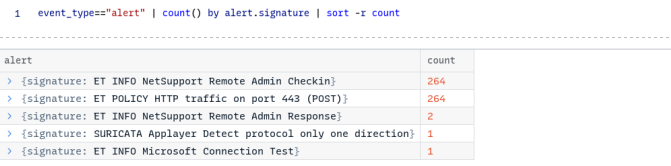
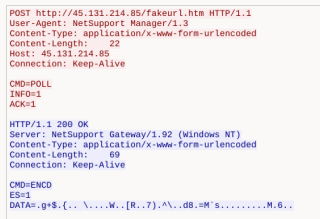

Exhibit ASuricata alerts in Zui
Evidence123Suricata alerts in Zui, counted by signature. By source, destination and port, 528 of them (264 + 264) go from 10.2.28[.]88 to 45.131.214[.]85 on port 443. The two single alerts are the domain controller (10.2.28[.]2) and the Windows connection test in Exhibit C.
The SIEM alarm is real in our own evidence. The NetSupport check-in rule fired 264 times, the server's response rule twice. The rule for HTTP POST on port 443 also fired 264 times, on the same requests.
- 1264 NetSupport check-ins: the alarm, found again in the evidence.
- 2The same 264 requests are plain HTTP POSTs on port 443, the port for encrypted HTTPS.
- 3The server answered only twice.
Annotations are hidden. This is the evidence as it was captured.
Exhibit BWireshark, Follow TCP Stream, stream 40
Evidence1234Wireshark filter ip.addr == 45.131.214[.]85, then Follow, TCP Stream, stream 40. The full stream holds 264 client packets and 2 server packets.
The client calls itself NetSupport Manager/1.3 and POSTs CMD=POLL: it is asking its server for orders. The server answers as NetSupport Gateway/1.92 with encoded data. Two details make this malicious, not just a remote-support tool: the destination, an outside IP that the SIEM already flags, with no company gateway in the environment, where /fakeurl.htm is a known NetSupport RAT control URI; and the port, plain readable HTTP on port 443, the port for encrypted HTTPS.
- 1A POST to /fakeurl.htm, a known NetSupport RAT control URI, as plain HTTP on port 443.
- 2The client names itself: NetSupport Manager/1.3.
- 3CMD=POLL: the client asks its server for orders.
- 4The server answers as a NetSupport Gateway, with encoded data.
Annotations are hidden. This is the evidence as it was captured.
Exhibit CZeek HTTP log in Zui
Noise: checked and set aside12Zeek's HTTP log in Zui, for the server of the one Microsoft Connection Test alert (23.47.50[.]182).
This alert is harmless. Windows itself (Microsoft NCSI) asked www.msftconnecttest[.]com for one small text file, /connecttest.txt, to check whether the computer has internet access. Every Windows computer does this. Port 80 is not a problem here: nothing secret is sent.
- 1An alert on the infected host, over plain HTTP on port 80.
- 2Windows' own internet check, Microsoft NCSI, asking for /connecttest.txt.
Annotations are hidden. This is the evidence as it was captured.
4. Timeline
- 19:55:0710.2.28[.]88 gets its address by DHCP as DESKTOP-TEYQ2NR, MAC 00:19:d1:b2:4d:ad (Zui, DHCP log). All times UTC, 2026-02-28.
- 19:55:09Windows checks its internet connection with www.msftconnecttest[.]com: harmless (Exhibit C).
- 19:55NetSupport check-ins to 45.131.214[.]85:443 begin; 264 in the capture (Exhibit A).
- 00:10:09The latest Kerberos record from 10.2.28[.]88, on March 1 (Zui, Kerberos log).
5. Verdict
True positive, severity high: DESKTOP-TEYQ2NR (10.2.28[.]88, account brolf) runs a NetSupport client that checks in with 45.131.214[.]85 and asks it for commands, and a remote access tool on a domain-joined computer is talking to an outside server. Open check: confirm with IT that NetSupport is not approved software here. Next: isolate the host, block 45.131.214[.]85 at the firewall and proxy, reset brolf's password and review the account's recent sign-ins. Escalate to Tier 2 to find how NetSupport got on the host and how it starts, and search other hosts for traffic to 45.131.214[.]85 and for the NetSupport Manager User-Agent.
6. Detection
title: NetSupport Manager Check-in Over HTTP
status: experimental
logsource:
  product: zeek
  service: http
detection:
  selection_user_agent:
    user_agent|startswith: 'NetSupport Manager'
  selection_uri:
    method: 'POST'
    uri|endswith: '/fakeurl.htm'  # the client sends the full URL in the request line
  condition: selection_user_agent or selection_uri
level: high

A company that really uses NetSupport through its own gateway: allowlist those gateway IPs. Not yet run in Zui; from the fields in Exhibits B and C, it should match the check-in and not the Windows check.7. Takeaway
Look for NetSupport clients in your Zeek HTTP logs and compare each server with your approved gateways: _path=="http" user_agent=="NetSupport Manager/1.3" | count() by id.orig_h, id.resp_h, id.resp_p
Allow remote-access tools only through your own approved gateways, and alert on anything else.
8. Hindsight
I trusted a file name before its size: my first extract left a 0-byte pcap with the right name, and only the size check caught it, so now I check size and hash before I open evidence. I first called every alert row bad, because the infected IP was in all of them; in a capture of one host, that host is in every row, so now I judge each row by the other side of the conversation. I first read port 80 as the suspicious part; the real warning sign was the opposite, plain HTTP on port 443. Zeek's Kerberos log showed only nulls while Wireshark showed the user name, so when one tool shows nothing I check with a second one. I looked for the full name only in LDAP and found nothing; next time I check every protocol the host uses with the domain controller, and I record the first and last check-in times while the VM is still open. Not verified: the user's full name, the exact first and last check-in times, and the detection rule in Zui.